> For the complete documentation index, see [llms.txt](https://docs.console.zenlayer.com/welcome/llms.txt). Markdown versions of documentation pages are available by appending `.md` to page URLs; this page is available as [Markdown](https://docs.console.zenlayer.com/welcome/ai-gateway/ai-gateway-integration/chatgpt.-hao-you-utools-plugin.md).
# ChatGPT.好友 (uTools Plugin)
**uTools ChatGPT.好友** is an AI plugin for **uTools** that allows users to access multiple AI models by connecting to the AI Gateway.
By binding an AI Gateway API key, the plugin can route requests through the gateway and interact with different model providers via a unified interface.
You can view [**Help Guide**](https://help.chats.li/) for more details about installation and API integration.
## API Endpoint Management
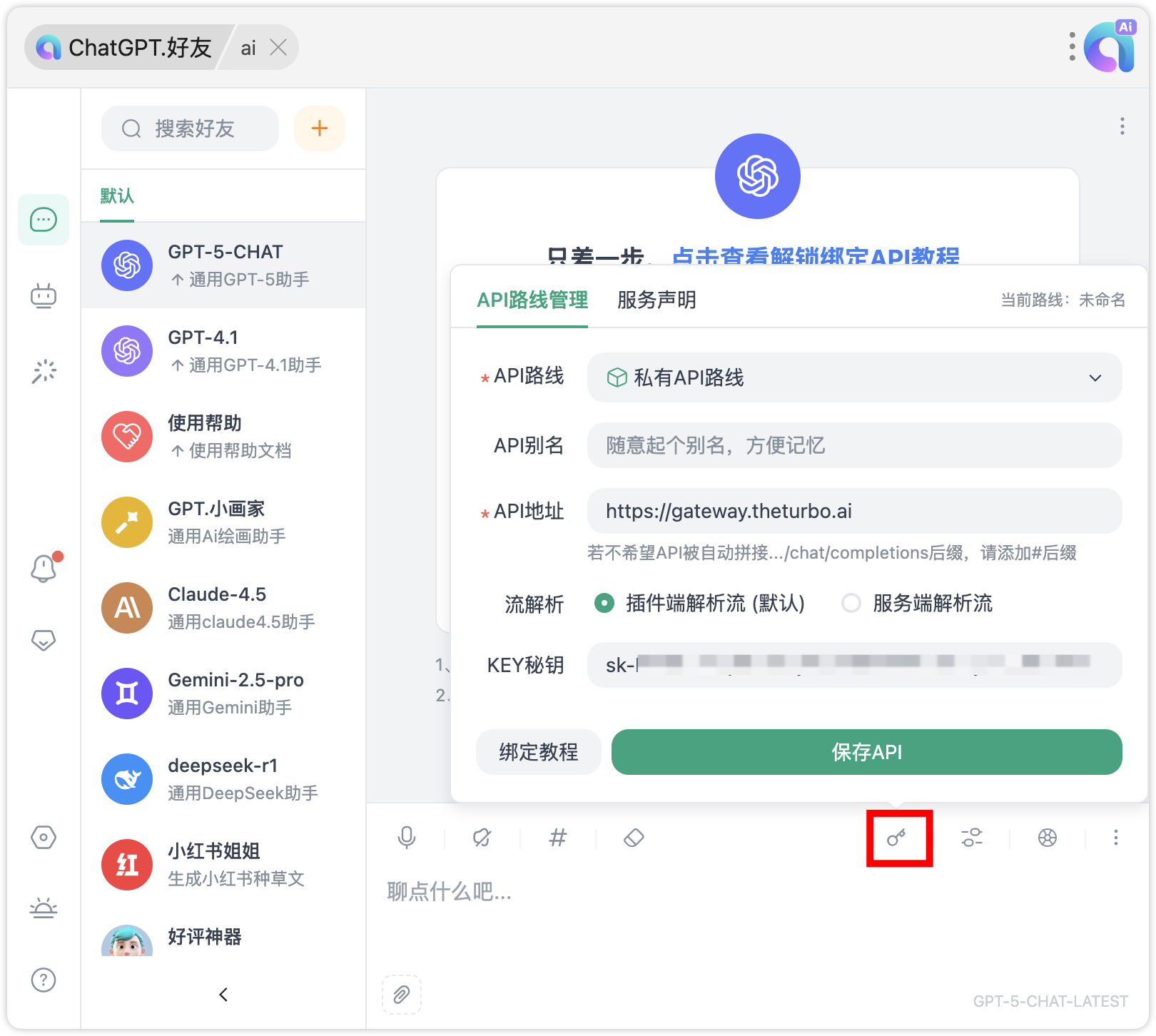
1. Click  to manage API endpoint.
2. Select Private API Route.
3. Enter `https://gateway.theturbo.ai` as the **API Base URL**, and provide the **API Key** generated after creating an AI Gateway instance.
to manage API endpoint.
2. Select Private API Route.
3. Enter `https://gateway.theturbo.ai` as the **API Base URL**, and provide the **API Key** generated after creating an AI Gateway instance.