> For the complete documentation index, see [llms.txt](https://docs.console.zenlayer.com/welcome/llms.txt). Markdown versions of documentation pages are available by appending `.md` to page URLs; this page is available as [Markdown](https://docs.console.zenlayer.com/welcome/cloud-networking/get-started/create-a-layer-3-connection/select-elastic-compute-as-access-point.md).
# Elastic Compute Access Type
The following configurations are applicable to elastic compute border gateway connection. You can connect to an existing border gateway created before, or create a new one.
[Border Gateway](/welcome/elastic-compute/networking/border-gateway.md) is a network node that connects your elastic compute resources in the global VPC to the Layer 3 backbone network.
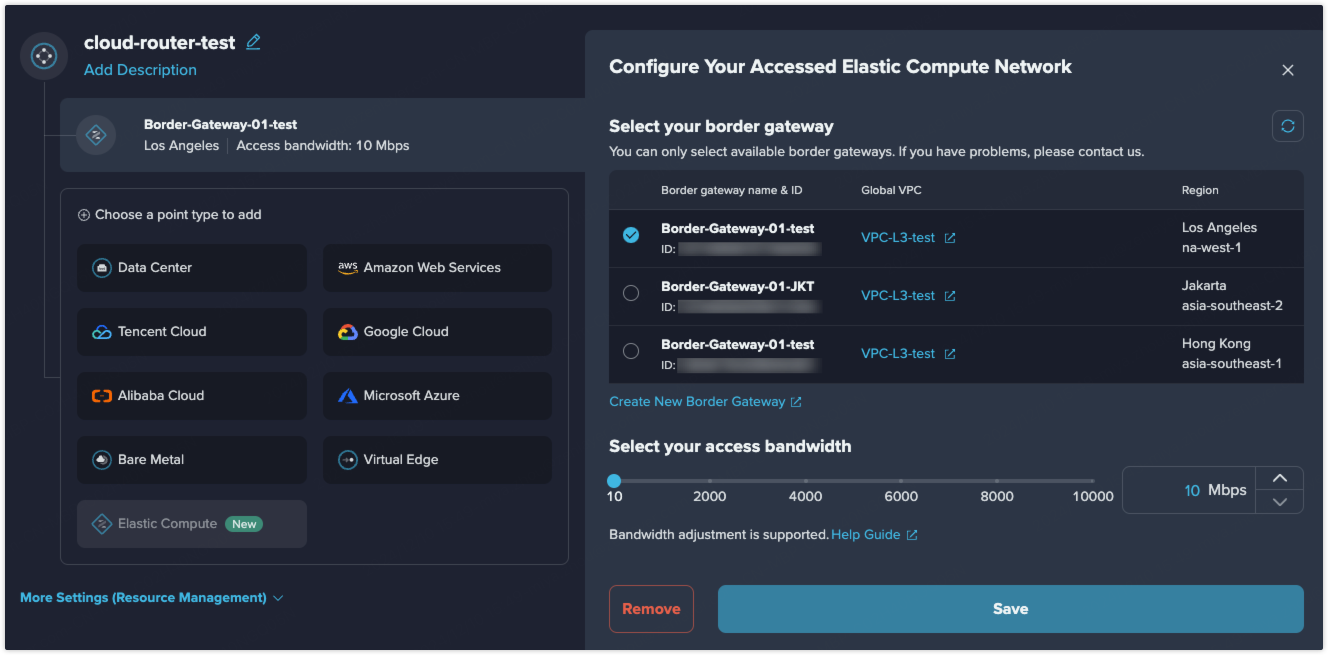
Elastic Compute Connection
Select the border gateway that you want to connect to the Layer 3 cloud router.
If you haven't got your desired border gateway, you can click **Create New Border Gateway** to create a new one. See [**Border Gateway Creation**](/welcome/elastic-compute/get-started/manage-networking/create-a-border-gateway.md) for more details.
{% hint style="info" %} **Note**
By default, only one elastic compute border gateway can be added into a Layer 3 cloud router.
{% endhint %}