> For the complete documentation index, see [llms.txt](https://docs.console.zenlayer.com/welcome/llms.txt). Markdown versions of documentation pages are available by appending `.md` to page URLs; this page is available as [Markdown](https://docs.console.zenlayer.com/welcome/cloud-networking/get-started/create-a-port/create-a-lag.md).
# Create a Port Aggregation (LAG)
Port aggregation (LAG) bundles multiple physical ports on the same device into a single logical link, providing bandwidth aggregation, link redundancy, and load sharing. This page covers the concept,
## Background Information
When you order a physical port on zenConsole, a single physical port can hit bandwidth bottlenecks, lack redundancy, and be cumbersome to scale as traffic grows or high availability is needed. Port aggregation (LAG, Link Aggregation Group) logically bundles multiple physical ports on the same switch into a single link, helping you solve three problems:
* Bandwidth aggregation: the bandwidth of multiple member ports is pooled into one logical bandwidth pool (for example, 3 × 10G ≈ 30G).
* Link redundancy / high availability: if any member port fails, traffic automatically converges to the remaining healthy links.
* Load sharing: inbound and outbound traffic is distributed across member ports by flow hashing.
{% hint style="info" %} Note
Bandwidth aggregation raises the upper limit of the aggregate bandwidth pool, but does not guarantee full-rate forwarding if a member link fails. For example, if a LAG of 2 × 10G is carrying about 15G of traffic and one link goes down, the remaining single 10G link cannot carry 15G, and the excess is dropped. For critical workloads, reserve redundant headroom so that the aggregate traffic stays within the total bandwidth of the members that would remain after a failure.
{% endhint %}
Zenlayer negotiates and maintains the aggregation state between the two ends using LACP (Link Aggregation Control Protocol), with the Zenlayer side fixed to Active mode and a Fast timeout: an LACPDU is sent every 1 second, and if no packet is received from the peer for 3 consecutive cycles (about 3 seconds), the member link is deemed failed and removed from the aggregation group (corresponding to LACP Short Timeout).
{% hint style="info" %} Note
Traffic is distributed by "flow hashing", so a single TCP/UDP flow always takes the same member port. A LAG therefore improves aggregate throughput and availability, but the bandwidth of a single flow is still capped by the speed of a single physical port.
{% endhint %}
## Constraints
Please note the following constraints when creating and managing a LAG:
* Same device: all physical ports in a LAG must be on the same switch.
* Member count: a LAG supports up to 8 member ports.
* Same speed: all member ports in a LAG must have the same speed.
* Same port type: all member ports must have the same port type as the LAG. Standard Ports and Unlimited Ports cannot be mixed.
* Carrier port: an empty LAG cannot be created — at least one port is required as the carrier during creation.
* LACP mode: the Zenlayer side is fixed to Active and cannot be changed; LACP passthrough is not supported on LAG-type ports and cannot be enabled.
* Billing unchanged: joining or leaving a LAG, or scaling members within a LAG, does not change the port's billing (see [Billing](#billing)).
## Create a Port Aggregation
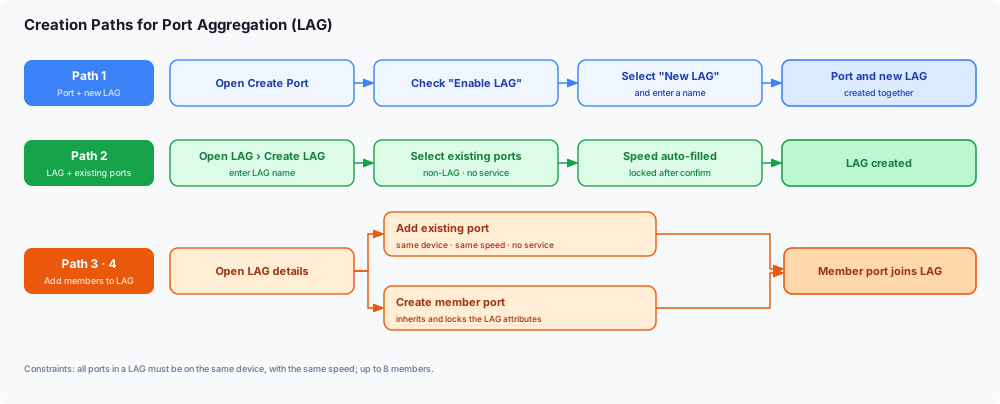
On the upper left corner of zenConsole, go to **Products** > **Cloud Networking** > **Port** > **LAG**. You can create a port aggregation in the following ways.
Creation paths for port aggregation
### Option 1: Create a LAG (with existing ports)
On the LAG list page, click **Create LAG** and configure the following in the dialog:
1. Enter the LAG name.
2. Select ports: only "non-LAG and no-service" ports are selectable. Once selected, the port speed is auto-filled from the actual specification and cannot be changed after confirmation.
3. The LACP mode is fixed to Active and cannot be changed.
### Option 2: Create a LAG when creating a port
On the [Create a Port](/welcome/cloud-networking/get-started/create-a-port.md) page, after configuring the port location and specification, select **Enable LAG** below Port speed, choose **New LAG**, and enter a LAG name. The port and the LAG are then created together.
{% hint style="info" %} Note
Enabling LAG is mutually exclusive with "Create a redundant port" — the redundant port is automatically cleared and disabled. The Create a Port page supports creating a new LAG only; to add a port to an existing LAG, do it from that LAG's details page.
{% endhint %}
### Option 3: Add member ports to an existing LAG
Open the target LAG's details page, and at the top right of the member port list choose:
* Create member port: goes to the Create a Port page, where the location, port type, specification, and target LAG are inherited from the current LAG and locked — you only need to complete the creation.
* Add existing port: select from eligible ports in the dialog. Eligible ports must be on the same device as the current LAG, have the same speed and port type, be non-LAG, and have no service.
## Manage a Port Aggregation
### LAG List
The LAG list shows the following information:
| Column | Description |
| --------------------- | ------------------------------------------------- |
| LAG name | The LAG name (editable) and its ID |
| Location | City · data center |
| Status | Normal (green) / Abnormal (red) |
| Ports | Number of member ports in the LAG |
| Associated services | Number of services associated with the LAG |
| Create time / Actions | View details / Add aggregated port / Dissolve LAG |
### LAG Details
The LAG details page contains two tabs: **Basic Information** and **Traffic Monitoring**.
* Basic information: port mode (LAG), LACP negotiation mode (Active, fixed), LACP negotiation status, LAG aggregate bandwidth, location, port speed, member ports (Up / total), associated virtual connections, and create time.
* Member port list: port name (click to jump to Port List with auto-search), physical status (Up / Down), LACP negotiation status (Selected / Unselected), time joined the LAG, and action (Remove).
* Traffic monitoring: shows the LAG aggregate traffic and per-member traffic, helping you check whether load sharing is balanced.
### Dissolve the LAG
A LAG has no separate "Delete" action — use "Dissolve LAG" to remove it.
{% hint style="info" %} Note
* A LAG can be dissolved only when it has no associated service and exactly one member port; otherwise "Dissolve LAG" is disabled.
* To dissolve a LAG with multiple member ports, first remove member ports until only one remains. The last member port cannot be removed — dissolve the LAG instead.
{% endhint %}
## Billing
Port aggregation is a network-layer configuration. It is not billed separately and does not change how your ports are billed:
* Each physical port is still billed by its speed and duration under the original port billing mode.
* Joining or leaving a LAG, and scaling members within a LAG, do not change the port's billing.
## Technical Notes: LAG and LACP
* LAG (Link Aggregation Group): follows the IEEE 802.1AX standard, logically bundling multiple physical links into a single link — like tying several cables into one thicker, more reliable cable.
* LACP (Link Aggregation Control Protocol): the two ends periodically exchange LACPDU packets to automatically negotiate which links can join the aggregation group and maintain their state. A link is either Selected (negotiated and forwarding) or Unselected (not negotiated and not forwarding). A failed member link is quickly removed from the group, and traffic converges to the remaining Selected links.