# 如何使用弹性 IP 作为公网出口 IP

弹性 IP 可以用作稳定可靠的公网出口 IP 地址，以实现需要持续可用性和可访问性的场景。

要将弹性 IP 用作公网出口 IP，我们将执行以下步骤：

## 步骤 1 - 购买并绑定弹性 IP

* 您可以在 zenConsole 上创建弹性 IP 并将其分配给所需实例。\
  请参阅 [**创建弹性 IP**](/welcome/cn/bare-metal/get-started/create-an-elastic-ip.md) 了解具体细节。
* 如果您已有弹性 IP，可以进入实例详情页面，将弹性 IP 分配给所需实例。\\

  <figure><img src="/files/Sxo1YtGQ0knrH81G9vxx" alt=""><figcaption></figcaption></figure>

{% hint style="info" %} <mark style="color:blue;">**注意**</mark>

<mark style="color:blue;">只有与实例位于同一区域的弹性 IP 才能被分配。</mark>
{% endhint %}

## 步骤 2 - 将弹性 IP 设为公网互联网出口 IP

您可以在实例上使用 `ip` 命令来设置弹性 IP 地址的优先级。以下是一个关于如何在 CentOS 7.6 操作系统实例中使用 `ip` 命令设置弹性 IP 地址优先级的示例：

<pre class="language-bash" data-full-width="false"><code class="lang-bash"><strong>sudo ip route add default via default-gateway src source-IP dev network-interface
</strong></code></pre>

* `default-gateway`: 默认网关地址；
* `source-IP`: 您要使用的弹性 IP 地址；
* `network-interface`: 与弹性 IP 地址关联的网卡。

{% hint style="info" %} <mark style="color:blue;">**注意**</mark>

* <mark style="color:blue;">这些设置是临时的，在系统重启后将失效。如果您希望永久设置弹性 IP，可以将相关命令添加到系统的启动脚本中。</mark>
* <mark style="color:blue;">设置可能因操作系统的版本而有所不同。建议您查阅系统的官方文档以了解更多相关配置。</mark>
  {% endhint %}

## 示例

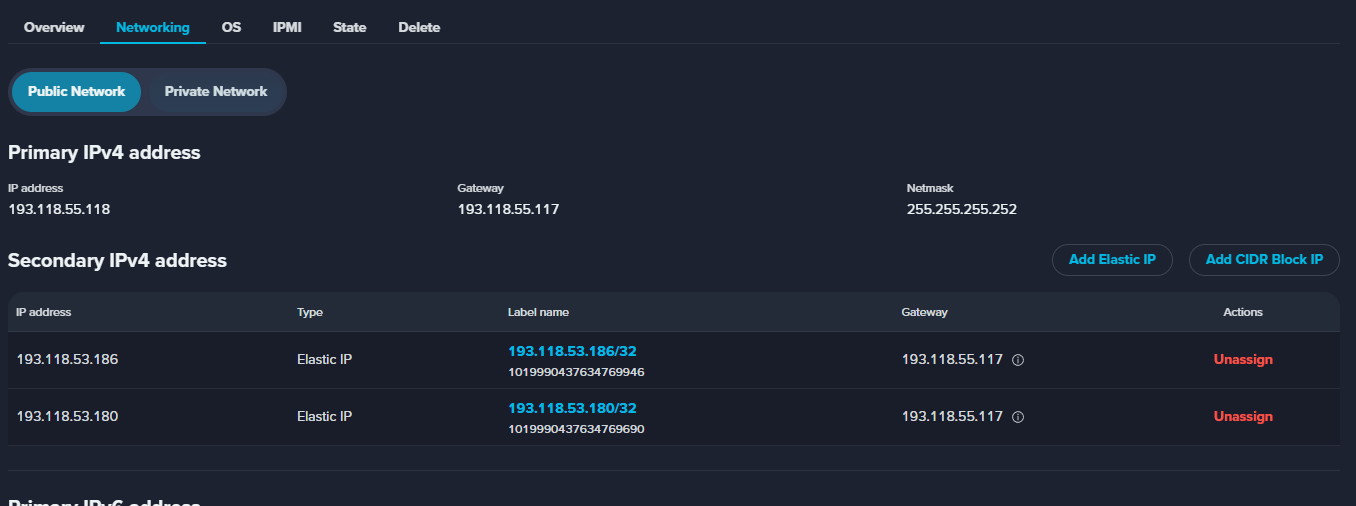
1. 对于 CentOS 7.6 操作系统实例，您已将 `193.118.53.186` 和 `193.118.53.180` 分配给您的实例。您希望将 `193.118.53.186` 设为公网出口 IP。可以看到网关 `193.118.55.117`。

<figure><img src="/files/7MPQCkVWp19DxWpeSwdX" alt=""><figcaption></figcaption></figure>

2. 使用 `ip a` 命令获取网卡信息。

<figure><img src="/files/OCAw96mcdnuemHRnpuhD" alt=""><figcaption></figcaption></figure>

在此情况下，

* `default-gateway`: `193.118.55.117`；
* `source-IP`: `193.118.53.186`；
* `network-interface`: `wan0`.

3. 执行以下命令：

<pre class="language-bash"><code class="lang-bash"><strong>sudo ip route add default via 193.118.55.117 src 193.118.53.186 dev wan0
</strong></code></pre>

## 结果

现在所有出站流量都将通过您设置的弹性 IP 地址。


---

# Agent Instructions: Querying This Documentation

If you need additional information that is not directly available in this page, you can query the documentation dynamically by asking a question.

Perform an HTTP GET request on the current page URL with the `ask` query parameter:

```
GET https://docs.console.zenlayer.com/welcome/cn/bare-metal/best-practice/how-to-use-an-elastic-ip-as-a-public-network-egress-ip.md?ask=<question>
```

The question should be specific, self-contained, and written in natural language.
The response will contain a direct answer to the question and relevant excerpts and sources from the documentation.

Use this mechanism when the answer is not explicitly present in the current page, you need clarification or additional context, or you want to retrieve related documentation sections.