# 公网地址互联

创建 IP Transit 时，您可以启用**公网地址互联**，为互联链路分配一个公网 IPv4 地址块。默认不启用。

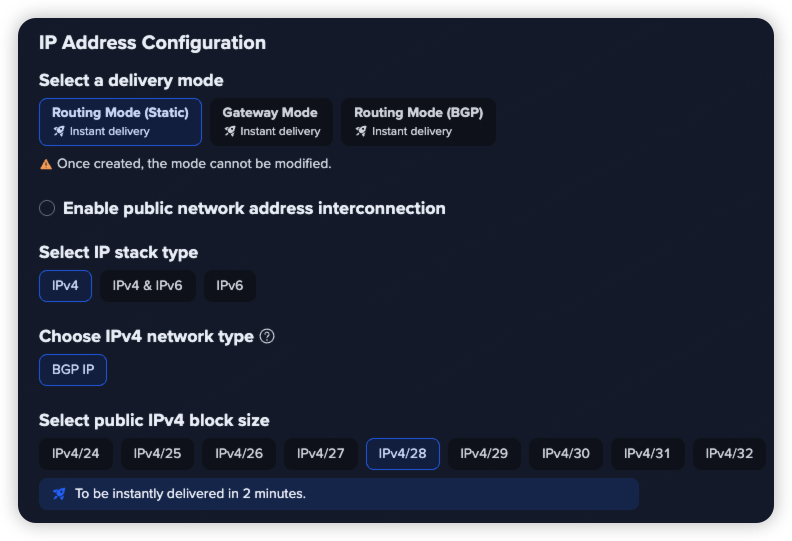
默认状态下，复选框未勾选，页面不展示任何额外配置项。

<figure><img src="/files/bNLFyo0yfT1uwpBPL3eN" alt=""><figcaption><p>公网地址互联 — 默认未勾选状态</p></figcaption></figure>

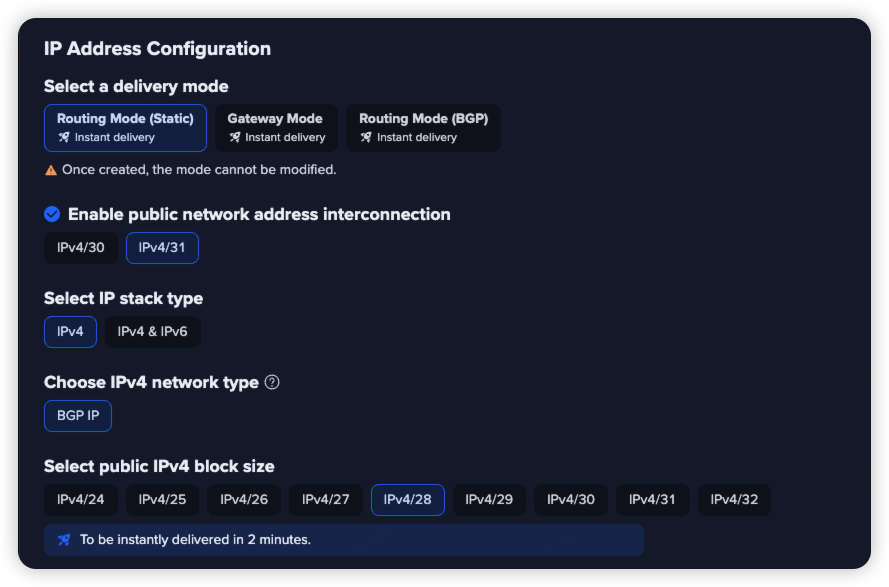
勾选后，互联地址块选择区域展开，默认选中 IPv4/31。

<figure><img src="/files/JisKByJIm4BsmpIAsmR9" alt=""><figcaption><p>公网地址互联 — 勾选后展开互联地址块配置</p></figcaption></figure>

{% hint style="info" %} <mark style="color:blue;">**注意**</mark>

<mark style="color:blue;">公网地址互联仅支持路由模式（静态路由）和路由模式（BGP），不支持网关模式。创建后不可修改。</mark>
{% endhint %}

## 互联地址块大小

勾选**公网地址互联**后，选择互联地址块大小：

| 地址块     | 可用地址数    | 说明                             |
| ------- | -------- | ------------------------------ |
| IPv4/31 | 2 个（点对点） | 无网络地址和广播地址消耗，适合点对点互联，**默认推荐**。 |
| IPv4/30 | 4 个      | 含网络地址和广播地址，适合需要这两类地址的场景。       |

## 费用

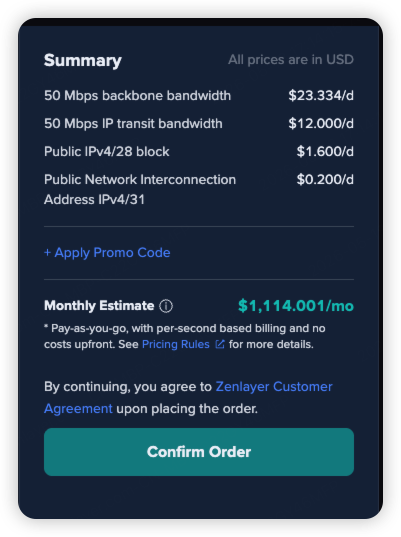
勾选后，订单概览中将在「公网 IPv4 地址块」费用行下方新增互联地址费用明细。取消勾选后，费用明细同步移除，总价恢复原始金额。

<figure><img src="/files/qW2yUje8Oc5q7KTIcHmh" alt=""><figcaption><p>订单概览 — 勾选后新增互联地址费用明细行</p></figcaption></figure>


---

# Agent Instructions: Querying This Documentation

If you need additional information that is not directly available in this page, you can query the documentation dynamically by asking a question.

Perform an HTTP GET request on the current page URL with the `ask` query parameter:

```
GET https://docs.console.zenlayer.com/welcome/cn/ip-transit/create-ip-transit/configure-public-interconnect-ip.md?ask=<question>
```

The question should be specific, self-contained, and written in natural language.
The response will contain a direct answer to the question and relevant excerpts and sources from the documentation.

Use this mechanism when the answer is not explicitly present in the current page, you need clarification or additional context, or you want to retrieve related documentation sections.