# 公网传输网络延迟

## **概览**

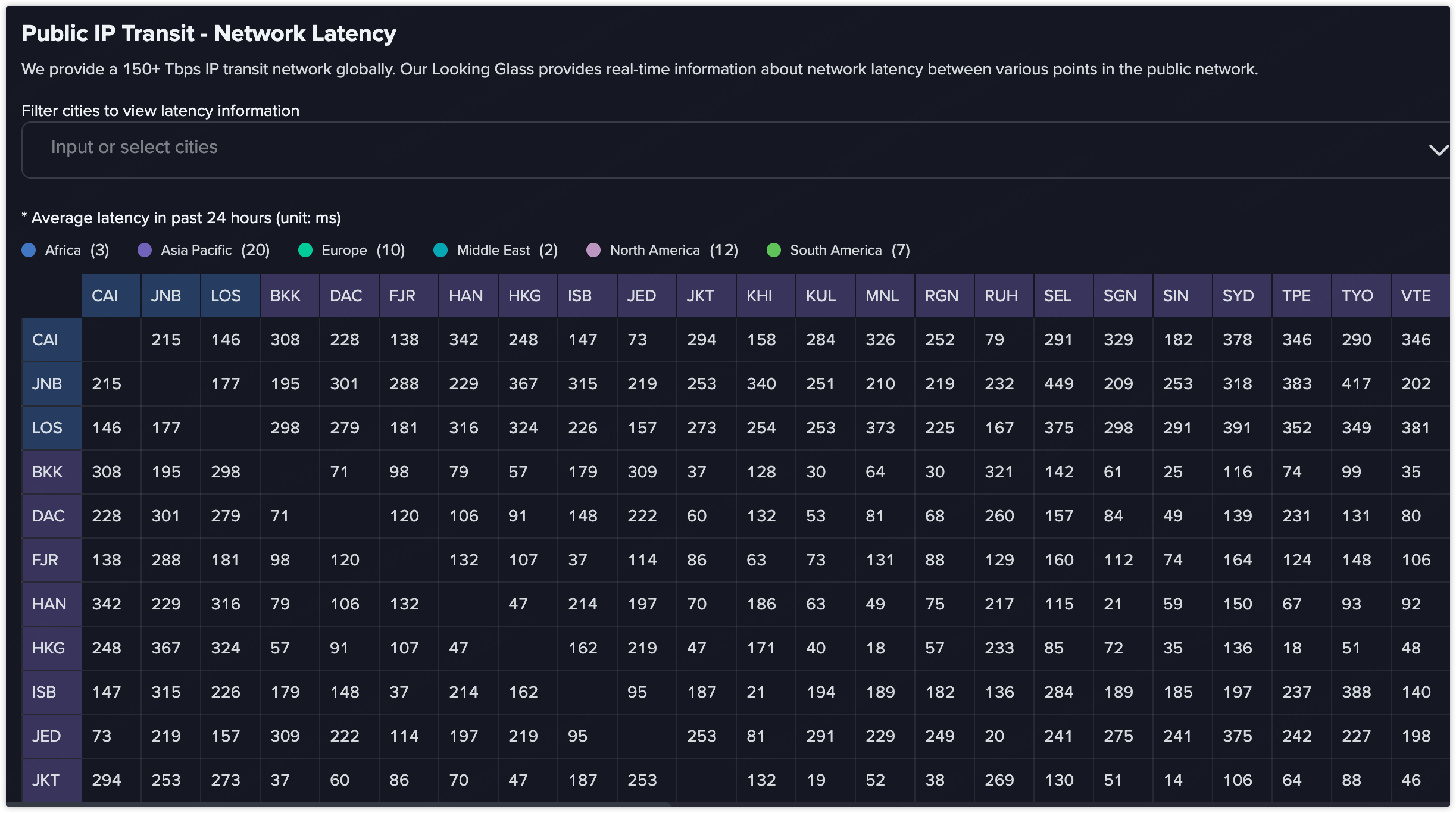
公共 IP Transit - 网络延迟（Public IP Transit - Network Latency）展示了 Zenlayer 全球 PoP 节点之间通过公网传输的实时平均延迟情况。该模块基于 Zenlayer 覆盖全球、容量超过 220+ Tbps 的 IP Transit 网络，帮助用户了解不同区域与运营商之间的公网路由质量。用户可借此监控公网健康状况、对比专线与公网的性能，并优化全球流量调度策略。

### **常见使用场景**

<table><thead><tr><th width="183.43896484375">场景</th><th>描述</th></tr></thead><tbody><tr><td>公网性能基准测试</td><td>评估全球不同区域间通过公网传输的端到端延迟表现</td></tr><tr><td>路由路径对比</td><td>将公网传输延迟与 Zenlayer 专用骨干进行性能比较</td></tr><tr><td>ISP 路径评估</td><td>识别城市间延迟高或表现不佳的公网链路</td></tr><tr><td>性能故障排查</td><td>检测跨境拥塞或异常路由行为</td></tr></tbody></table>

## **操作流程**

<div align="left"><figure><img src="/files/AOhMFs7Mi5WcXiRyTOYu" alt=""><figcaption></figcaption></figure></div>

### **参数说明**

<table><thead><tr><th width="182.1854248046875">参数</th><th>描述</th></tr></thead><tbody><tr><td>PoP 节点</td><td>参与公网传输的 Zenlayer 网络节点，每一行/列代表一个城市的 PoP。</td></tr><tr><td>平均延迟（ms）</td><td>表示过去 24 小时内，两个 PoP 之间通过公网传输的平均往返延迟。</td></tr><tr><td>区域标签</td><td>所有 PoP 按地理区域（如亚太、欧洲、北美）分组，并使用颜色进行区分，便于识别区域间网络模式。</td></tr></tbody></table>

### **操作步骤**

1. 输入或选择一个或多个城市，生成延迟矩阵；
2. 图表将展示所选 PoP 节点间过去 24 小时内的平均往返延迟（单位：毫秒）；
3. 将鼠标悬停在任意单元格上，即可查看对应城市对及其延迟值。

## **常见问题解答（FAQ）**

**Q1：延迟值代表什么？**\
**A1**：表示两个 PoP 节点通过公网 IP Transit 网络传输的平均往返延迟，基于过去 24 小时的监测数据。

**Q2：为什么公网延迟高于专线骨干？**\
**A2**：公网路由受网络拥塞、ISP 对等策略和非可控路径选择影响，延迟和稳定性通常不如 Zenlayer 的专用骨干网络。

**Q3：是否支持导出延迟数据？**\
**A3**：目前暂不支持导出。如需详细报告，请联系 Zenlayer 客服或您的客户经理。

**Q4：数据多久更新一次？**\
**A4**：延迟数据持续采集，当前展示的是最近 24 小时的平均值，并定期更新以反映网络最新状况。


---

# Agent Instructions: Querying This Documentation

If you need additional information that is not directly available in this page, you can query the documentation dynamically by asking a question.

Perform an HTTP GET request on the current page URL with the `ask` query parameter:

```
GET https://docs.console.zenlayer.com/welcome/cn/platform/looking-glass/public-transit-latency.md?ask=<question>
```

The question should be specific, self-contained, and written in natural language.
The response will contain a direct answer to the question and relevant excerpts and sources from the documentation.

Use this mechanism when the answer is not explicitly present in the current page, you need clarification or additional context, or you want to retrieve related documentation sections.
