> For the complete documentation index, see [llms.txt](https://docs.console.zenlayer.com/welcome/llms.txt). Markdown versions of documentation pages are available by appending `.md` to page URLs; this page is available as [Markdown](https://docs.console.zenlayer.com/welcome/elastic-compute/best-practice/what-happens-if-a-cloud-host-fails-instance-failover-and-recovery-explained.md).
# What Happens If a Cloud Host Fails? Instance Failover & Recovery Explained
Learn how Zenlayer Elastic Compute handles host failures with automatic instance failover and recovery. Understand downtime expectations, data safety, and high availability best practices.
## Introduction
Zenlayer Elastic Compute is designed to maintain service continuity even in the event of underlying hardware failures. This guide explains what happens when a host fails, how instance failover works, and what recovery actions users should expect.
#### This guide answers:
* What happens if the physical host of my instance fails?
* Will my instance restart automatically?
* Will my data be lost during a hardware failure?
* How long does recovery take?
* How can I design my deployment for higher availability?
## Scope and Operating Model
Automated failover is used for **unplanned and unknown failures**. For **planned and known-risk operations** (for example, host firmware upgrades or core software upgrades), ZEC performs risk assessment, executes live migration directly, and sends customer notifications for the live migration activities.
Standard operating split:
* Known-risk operations: planned live migration.
* Unknown incidents: automated failover.
***
## 1. Recovery Time Baseline
The recovery process is split into three phases: **failure confirmation + automated failover + online validation**.
| Phase | Description | Typical Duration (Reference) |
| -------------------- | -------------------------------------------------------------------------------------------- | --------------------------------------------------------------------- |
| Failure confirmation | Cross-check multiple health signals to separate transient instability from real host failure | About `3-5` minutes |
| Automated failover | Select healthy target hosts and complete instance relocation | Typically `2-8` minutes; up to `8-15` minutes for larger-scale impact |
| Online validation | Validate instance startup and service availability | About `1-5` minutes |
Operational interpretation:
* Single-host fault, limited impacted instances, sufficient spare capacity: typically `5-12` minutes end-to-end.
* `8-15` minutes mainly appears when impact scale is higher and recovery must run in batches.
* `15+` minutes is a non-standard case, usually tied to large-scale/complex conditions or manual takeover.
### 1.1 Comparison: Automated Failover vs. Host Reboot and Relaunch
| Recovery Path | Typical Behavior | Time Characteristics |
| ------------------------------------ | ------------------------------------------------------------------------------------------------------- | ----------------------------------------------------------------------------------------------------------------------------------------------------------------------------------- |
| Automated failover | Workloads are relocated to healthy hosts and validated online | Typically `5-12` minutes in standard single-host scenarios |
| Reboot and relaunch on the same host | Wait for failed host power cycle, hardware initialization, OS/services recovery, then workload relaunch | Usually slower and less deterministic; on Dell servers, hardware startup alone is commonly `10+` minutes (including iDRAC/hardware initialization), before OS and workload recovery |
Operational implication:
* For unknown host incidents, automated failover generally restores service availability faster than waiting for host reboot and same-host relaunch.
***
## 2. Failure Identification Method
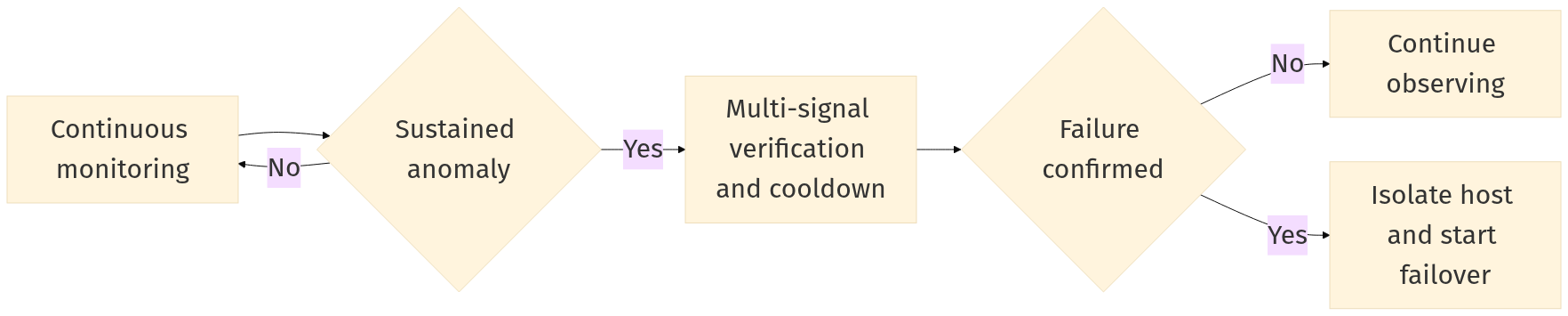
ZEC uses a **continuous observation + multi-signal verification + cooldown window** model:
* Continuous observation: failover is not triggered by a single failed probe.
* Multi-signal verification: network reachability, control-plane reachability, and host responsiveness are evaluated together.
* Cooldown window: short stabilization period before final confirmation to filter transient jitter.
***
## 3. Failure Decision Flow
***
## 4. Recovery Timeline
Main factors affecting duration:
* Number of impacted instances (single instance vs. batch scale)
* Instance size mix (larger SKUs need stricter placement matching)
* Real-time spare capacity (higher spare capacity generally shortens recovery)
* Fault scope (single-host faults are usually faster than broader incidents)
***
## 5. Recovery Time by Scenario
| Scenario | Expected Recovery Time |
| ------------------------------------------------------------------------------------------------ | --------------------------------- |
| Standard: single host failure, limited impacted instances, sufficient capacity | Typically `5-12` minutes |
| Medium scale: more impacted instances, wave-based recovery required | Typically `8-15` minutes |
| Large-scale/complex: large batch, high large-SKU ratio, tight capacity, or suppression triggered | `15+` minutes, or manual takeover |
Recommended communication baseline:
* Most single-point host failures recover within `5-12` minutes.
* `8-15` minutes corresponds to medium-scale batch recovery.
* `15+` minutes is treated as a non-standard large-scale or complex incident path.
***
## 6. Planned Live Migration for Known-Risk Operations
For known-risk host operations, ZEC uses direct live migration before host changes.
{% stepper %}
{% step %}
#### Identify and assess risk
Identify known-risk host operation and complete risk assessment.
{% endstep %}
{% step %}
#### Verify prerequisites
Verify target capacity and migration prerequisites.
{% endstep %}
{% step %}
#### Notify customers
Send customer notification for live migration.
{% endstep %}
{% step %}
#### Perform migration
Perform live migration while workloads remain online.
{% endstep %}
{% step %}
#### Confirm drain
Confirm the source host is drained.
{% endstep %}
{% step %}
#### Execute host operation
Execute host operation (firmware/core software).
{% endstep %}
{% step %}
#### Post-change verification
Run post-change health verification and return host to service pool.
{% endstep %}
{% endstepper %}
### Simplified Live Migration Flow
***
## 7. Why Block Storage Service Enables Fast Failover
Fast host-level failover depends on compute-storage decoupling. With block storage service:
* VM system and data disks stay on shared networked block volumes.
* During failover, compute placement changes while disk state remains reusable.
* Recovery can proceed on a healthy host without rebuilding from host-local disks.
If storage is host-local, storage state is bound to the failed node, and rapid failover is significantly harder. At present, **all ZEC instances are based on block storage service**, so this model applies platform-wide.
***
## 8. Automated Recovery Actions and External Outcome States
Core automated actions:
{% stepper %}
{% step %}
#### Fault isolation
Remove unhealthy host from scheduling path.
{% endstep %}
{% step %}
#### Priority-based recovery
Recover previously running instances first.
{% endstep %}
{% step %}
#### Safe state transition
Enforce consistency controls during host switch.
{% endstep %}
{% step %}
#### Post-failover validation
Confirm startup and online status after relocation.
{% endstep %}
{% endstepper %}
Externally visible outcome states:
* **Fully recovered**: all impacted instances restored.
* **Partially recovered**: most instances restored, with a subset in manual handling.
* **Manual takeover in progress**: suppression or exceptional conditions require human-led recovery.