> For the complete documentation index, see [llms.txt](https://docs.console.zenlayer.com/welcome/llms.txt). Markdown versions of documentation pages are available by appending `.md` to page URLs; this page is available as [Markdown](https://docs.console.zenlayer.com/welcome/elastic-compute/load-balancing/add-backend-servers-to-a-listener.md).
# Add Backend Servers to a Listener
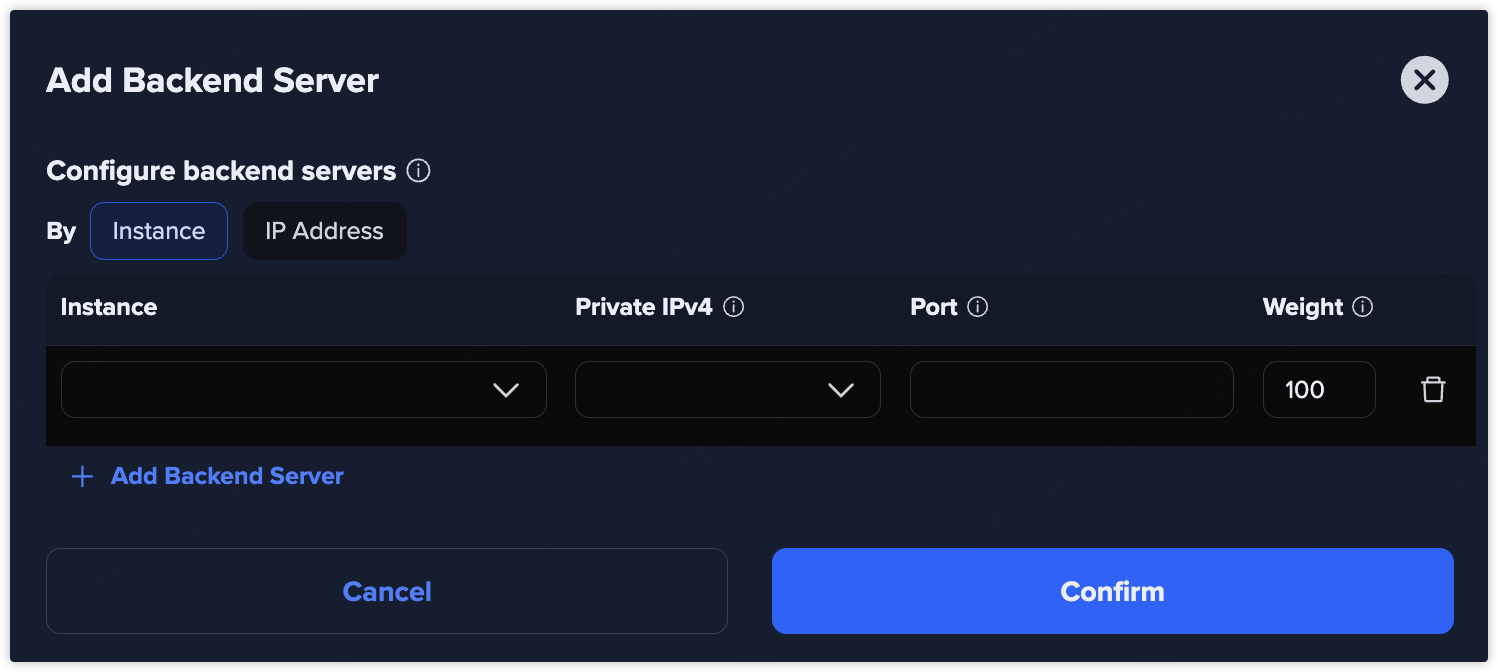
Backend servers receive traffic forwarded by the listener. You can configure backend servers in one of the following ways:
* **By Instance**: Select backend servers directly from existing elastic compute instances.
* **By IP Address**: Manually specify backend server IP addresses.
After the listener is created, you can add backend servers to the listener by going to the listener list page and selecting **Actions** > **Add Backend Server**.
### By Instance
When adding backend servers by **Instance**, you select compute instances directly from the resource list. Backend services run on cloud instances and you can have a simpler, cloud-native management.
#### Instance
Select the elastic compute instance to add.
The instance and the load balancer must be in the same-region subnet under one global VPC.
#### Private IPv4
The private IP address of the elastic compute instance, used by the listener for request forwarding and health checks.
#### Port
The target port for request forwarding and health checks.
Specify only one port in the range from `1` to `65535`. If empty, it will follow the listening port configuration.
#### Weight
The proportion of requests allocated to each backend server. The higher the weight, the more requests the server will receive.
Weight ranges from `0` to `65535`, and the default weight is `100`. A weight of `0` means the server will not accept new requests.
Click **Add Backend Server** to add more backend servers.
### By IP Address
When adding backend servers by **Private IP**, you manually specify the private IP addresses of backend servers. Backend servers are identified **only by IP**. It is a more flexible and IP-based configuration.
#### Private IPv4
The private IP address of the elastic compute instance, used by the listener for request forwarding and health checks.
#### Port
The target port for request forwarding and health checks.
Specify only one port in the range from `1` to `65535`. If empty, it will follow the listening port configuration.
#### Weight
The proportion of requests allocated to each backend server. The higher the weight, the more requests the server will receive.
Weight ranges from `0` to `65535`, and the default weight is `100`. A weight of `0` means the server will not accept new requests.
Click **Add Private IPv4** to add more private IPv4 addresses.
{% hint style="success" %} **Hint**
You can also go to **Backend server list** > **Actions** > **Remove** on Details page to remove a backend server.
{% endhint %}