# Origin Path Rewrite

CDN modifies the path of the request URL when fetching from the origin.

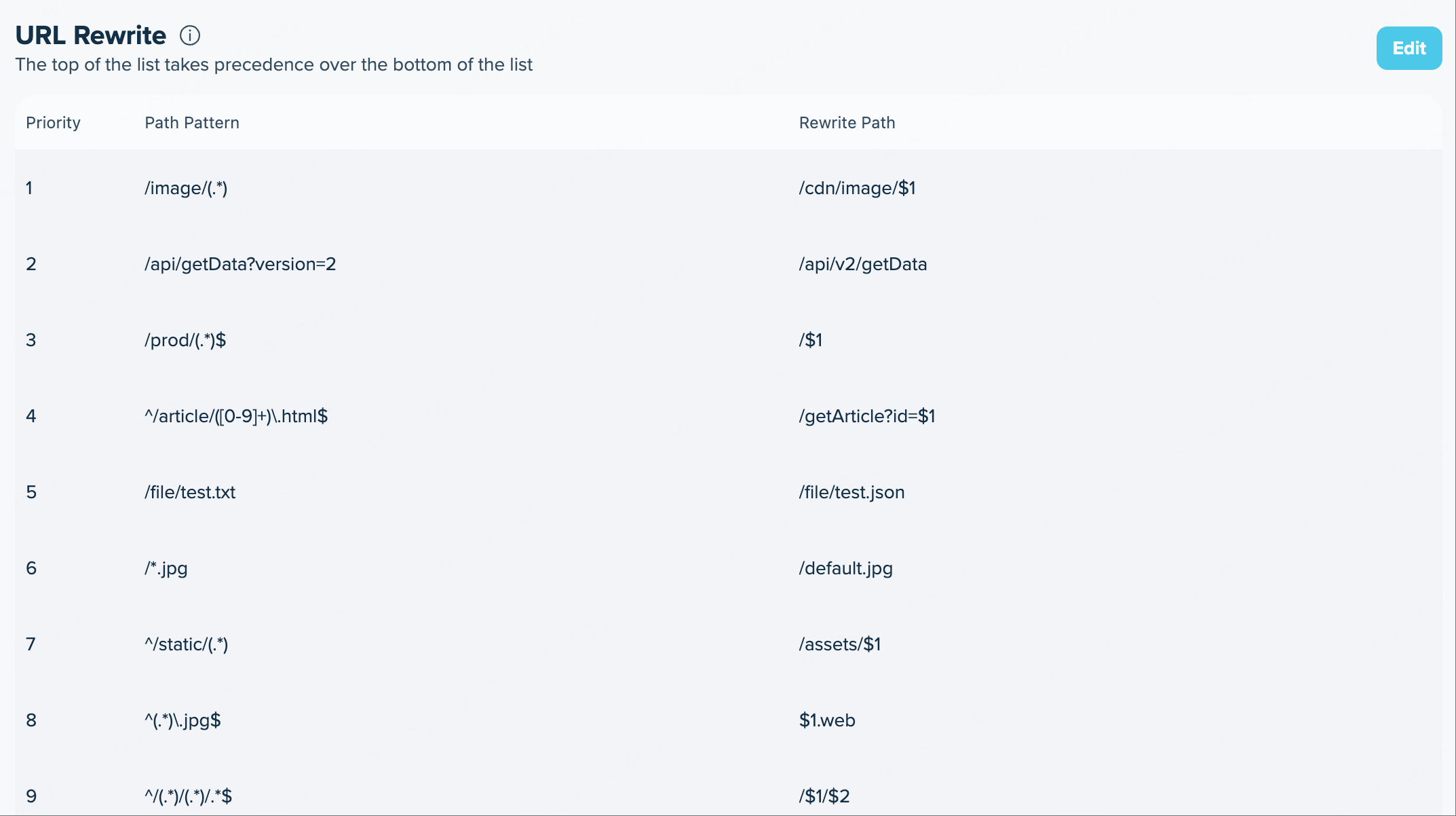
<figure><img src="https://3201622183-files.gitbook.io/~/files/v0/b/gitbook-x-prod.appspot.com/o/spaces%2F9X3FDdkCL2HzhbPpPMFt%2Fuploads%2FX9Vjq9hZrkFP9TpV2LNE%2Forigin_path_rewrite.png?alt=media&#x26;token=975dd05a-5e43-422b-80ff-1705a7508e4b" alt=""><figcaption></figcaption></figure>

After configuring origin path rewriting, when a user requests a file that is not cached, the CDN will rewrite the path in the URL to the new path in the origin request.

<table><thead><tr><th width="149.75311279296875">Configuration</th><th>Description</th></tr></thead><tbody><tr><td>Priority</td><td><p>Represents the priority of the rule. A rule with a number 1 has the highest priority.</p><p>When receiving a request, CDN tries to match the request with the rules from highest to lowest priority. If a request matches a rule, the CDN stops matching the remaining rules.</p><p>You can adjust the priority of rules by dragging and dropping.</p></td></tr><tr><td>Path Pattern</td><td><p>Specifies the path in the user request URL, with a maximum length of 1,024 characters. The path does not include the protocol, domain name, or query parameters.</p><p>You can use regular expressions in this setting, in which case it defines a matching rule. Groups can also be specified in the regular expression by enclosing them in parentheses (). These groups can then be referenced in the CDN origin path configuration.</p><p>For example, ^/a/b/(.*)$ matches all directories and files under the /a/b/ path.</p></td></tr><tr><td>Target Path</td><td><p>Specifies the path that replaces the user request path in the origin request URL. This configuration must meet the following requirements:</p><ul><li>The length must not exceed 1,024 characters;</li><li>It cannot contain consecutive slashes (//), percent signs (%), spaces, or question marks (?).</li><li>It must not include the protocol, domain name, or query string.</li></ul><p>The CDN retains the query string from the request URL and appends it to the actual origin URL.<br>If the User Request Path configuration contains a regular expression with one or more capture groups, you can use in the CDN origin path configuration to reference the captured group. 1 represents the first group, 2 the second, and so on. In this case, the configuration defines a matching rule.<br>Based on the example in the User Request Path configuration, suppose you specify the origin path as /c/1. Here, /c/$1 indicates that the path starts with /c/, and the remainder of the path corresponds to the portion matched by .* in the user request path. If the user request URL is <code>https://www.example.com/a/b/test/1.png</code>, the origin request URL will be rewritten as <code>https://www.example.com/c/test/1.png</code>.</p></td></tr></tbody></table>
