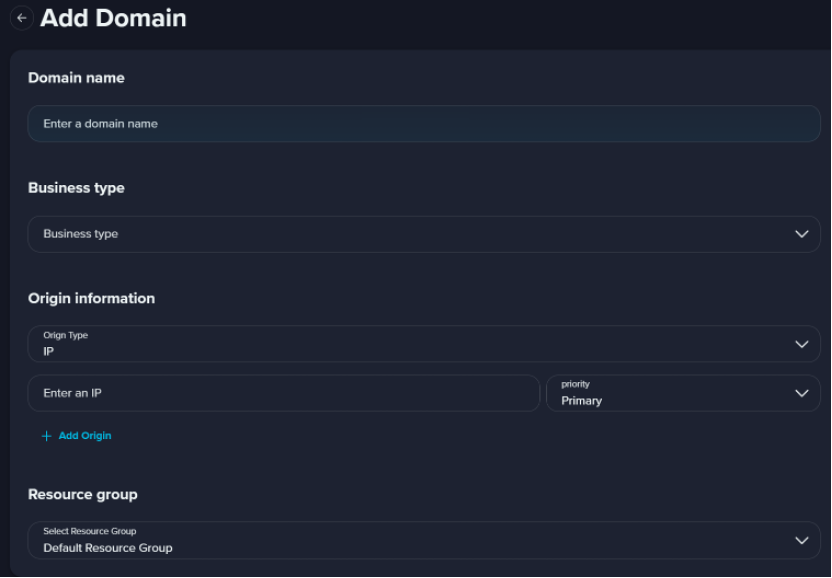
| Domain Name | - Domain name format
- The domain name must be 1 to 67 characters in length.
- The domain name can contain lowercase letters, digits, and hyphens (-). Example: example.com.
- The domain name cannot contain Chinese characters, uppercase letters, or characters other than hyphens (-). The domain name cannot be a hyphen (-). A hyphen (-) in a domain name cannot be followed by another hyphen (-). The domain name cannot start or end with a hyphen (-). - ICP filing
If you set the acceleration region of a domain name to Global or Chinese Mainland Only, you must apply for an ICP number for the domain name. - Domain name type
The domain name that you want to accelerate can be a specific domain name such as example.zenlayer.com.
|
| Business Type | - Small File Download
Accelerates the delivery of small-sized static content on websites, such as e-commerce content and game images. - Large File Download
Accelerates the delivery of static files that are larger than 20 MB. - Dynamic Acceleration
Accelerates the delivery of both static and dynamic content. Dynamic Content Delivery Network can accelerate the delivery of large amounts of dynamic content.
|
| Origin Info | - IP Address
You can configure one or more IP addresses for an origin server. Private IP addresses are not supported. IPv4 addresses are supported. - Site Domain
Enter the domain names of one or more origin servers.
Note The origin domain name must be different from the accelerated domain name. Otherwise, a DNS resolution loop occurs, and requests cannot be redirected to the origin server. |
| Region | - Chinese Mainland Only
If you select Chinese Mainland Only, all requests are scheduled to edge nodes that are deployed in the Chinese Mainland. The accelerated domain name must have a valid Internet Content Provider (ICP) number. - Global
If you select Global, all requests are delivered to the nearest edge nodes. The accelerated domain name must have a valid ICP number. - Global (Excluding the Chinese Mainland)
If you select Global (Excluding the Chinese Mainland), all requests except from the Chinese Mainland work the same as Global option. Requests from the Chinese Mainland are delivered to edge nodes that are deployed in Japan, Singapore, or Hong Kong (China). ICP number is not required for the accelerated domain name.
|
| Resource Group | Assign this domain to a resource group. Note Regarding how to create resource group, see Resource Management. |