# Referer Restrictions

Referer-based hotlink protection refers to access control based on the Referer header.

For example, you can configure a Referer whitelist to allow only specified requests to access your resources or a blacklist to block specified requests. Referer-based hotlink protection identifies and filters user identities and protects your resources from unauthorized access.

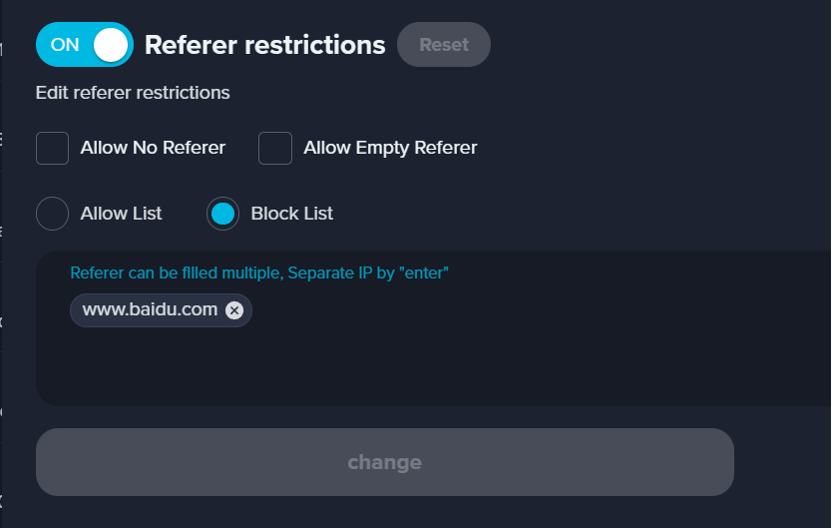
<div align="left"><figure><img src="/files/V6WTXOTqoPfpflVMCKj5" alt="" width="375"><figcaption></figcaption></figure></div>

<table><thead><tr><th width="147">Parameter</th><th>Description</th></tr></thead><tbody><tr><td>Allow No Referer</td><td>The rule allows the client to not include the UA field in the request header.</td></tr><tr><td>Allow Empty Referer</td><td>The rule allows clients to request UA with empty value in the header</td></tr><tr><td>Allow List &#x26; Block List</td><td><ul><li>Allow list<br>Specifies the redirect URL. If the Referer information in the request does not match the whitelist, the HTTP 403 status code is not returned after the request is blocked. Instead, the HTTP 302 status code and the Location header are returned. This parameter is the value of the Location header that starts with <code>http://</code> or <code>https://</code>, such as <code>http://www.example.com</code>.</li><li>Block list<br>Specifies the redirect URL. If the Referer information in the request matches the blacklist, the HTTP 403 status code is not returned after the request is blocked. Instead, the HTTP 302 status code and the Location header are returned. This parameter is the value of the Location header that starts with <code>http://</code> or <code>https://</code>, such as <code>http://www.example.com</code>.</li></ul></td></tr></tbody></table>


---

# Agent Instructions: Querying This Documentation

If you need additional information that is not directly available in this page, you can query the documentation dynamically by asking a question.

Perform an HTTP GET request on the current page URL with the `ask` query parameter:

```
GET https://docs.console.zenlayer.com/welcome/content-delivery-network/domain-management/access-control/referer-restrictions.md?ask=<question>
```

The question should be specific, self-contained, and written in natural language.
The response will contain a direct answer to the question and relevant excerpts and sources from the documentation.

Use this mechanism when the answer is not explicitly present in the current page, you need clarification or additional context, or you want to retrieve related documentation sections.