> For the complete documentation index, see [llms.txt](https://docs.console.zenlayer.com/welcome/llms.txt). Markdown versions of documentation pages are available by appending `.md` to page URLs; this page is available as [Markdown](https://docs.console.zenlayer.com/welcome/content-delivery-network/resource-management/create-resource-group.md).
# Create Resource Group
{% hint style="info" %} **Note**
Only users with `AdministratorAccess` can create resource group. See [User and Permissions](/welcome/content-delivery-network/user-and-permissions.md)*.*
{% endhint %}
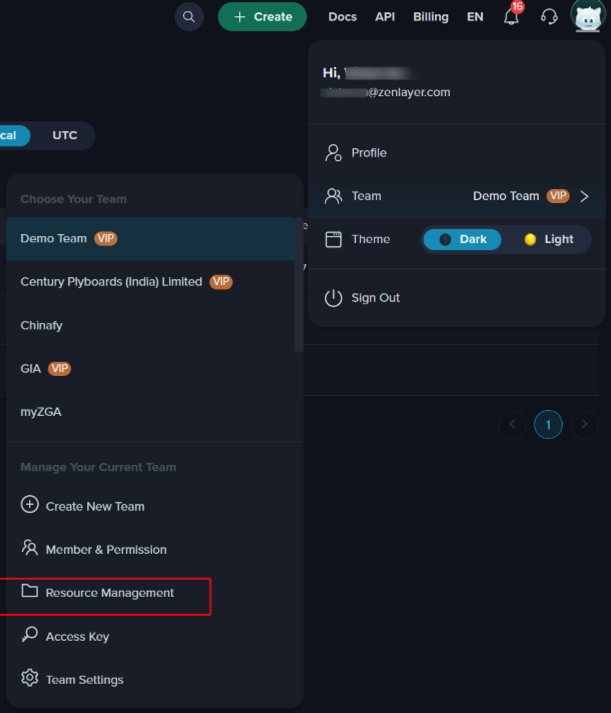
1. Click the team name on the right top and click **Resource Management**.
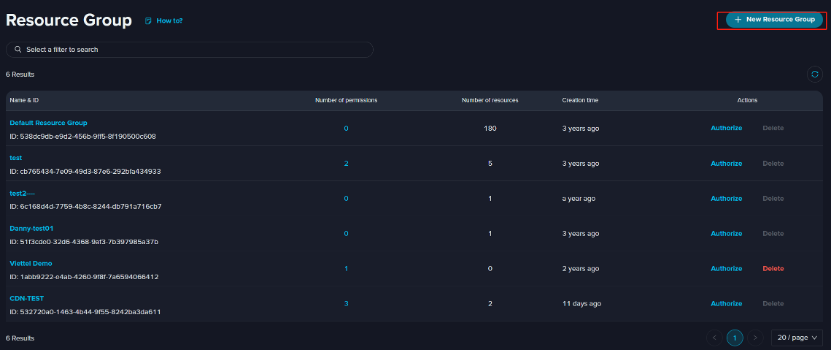
2. **Default resource group** has been created and all your domains already delivered are in this group. You can click **New Resource Group** to create new groups.