> For the complete documentation index, see [llms.txt](https://docs.console.zenlayer.com/welcome/llms.txt). Markdown versions of documentation pages are available by appending `.md` to page URLs; this page is available as [Markdown](https://docs.console.zenlayer.com/welcome/global-accelerator/get-started/manage-ssl-certificates/deploy-a-certificate.md).
# Deploy a Certificate
After you upload your third-party certificate, you can deploy it to your Zenlayer cloud services.
## Prerequisites
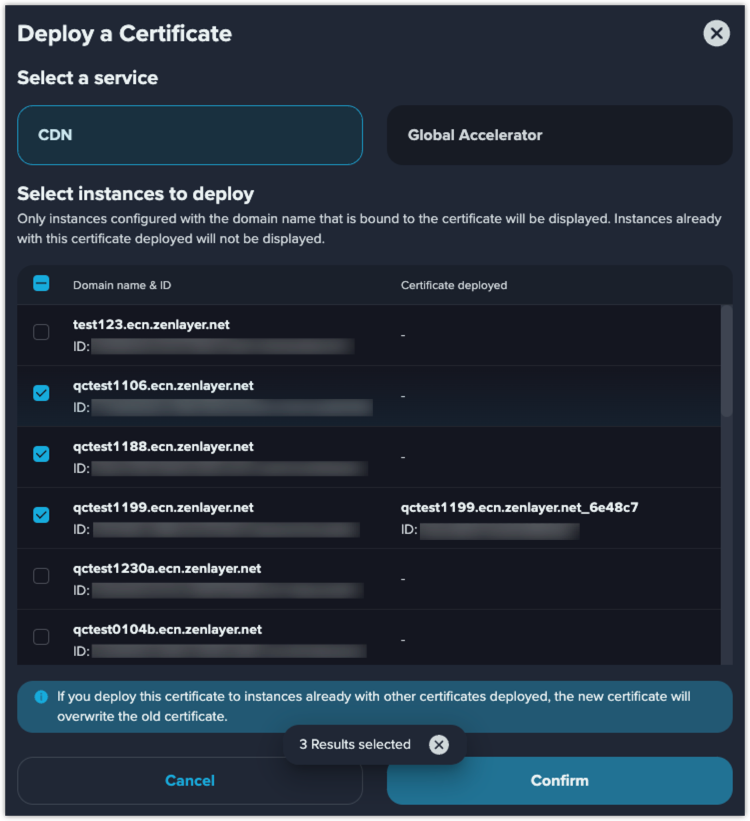
1. You can deploy certificates to services like CDN or Global Accelerator. The service permissions vary by accounts. This illustration is for reference only.
2. The service that you want to deploy a certificate, must be configured with a domain name that is bound to this certificate.
3. If you want to enable the certificate-related functions such as HTTPS, you must deploy a certificate.
Deploy a Certificate
## Procedures
1. Select a kind of services you want to deploy the certificate.
2. Select the instances you want to deploy the certificate.
{% hint style="info" %} **Note**
If you deploy a new certificate to instances already with other certificates deployed, the new certificate will overwrite the old certificate.
{% endhint %}
## Result
After you deploy the certificate, view the instances in **Related resources** column of the certificate list.