> For the complete documentation index, see [llms.txt](https://docs.console.zenlayer.com/welcome/llms.txt). Markdown versions of documentation pages are available by appending `.md` to page URLs; this page is available as [Markdown](https://docs.console.zenlayer.com/welcome/ip-transit/create-ip-transit/gateway-mode-configuration.md).
# Gateway Mode Configuration
**Gateway Mode** is a delivery mode where the customer accesses the IPT service through a designated gateway device managed by the service provider. In this mode:
* Customers do **not** need to manage their own IP addresses.
* The gateway handles routing and network translation functions.
* Suitable for customers with **simpler network architectures** who do not require dynamic routing.
* Allows easy access to public IP resources without complex configuration.
* The service provider manages the backbone connectivity and routing.
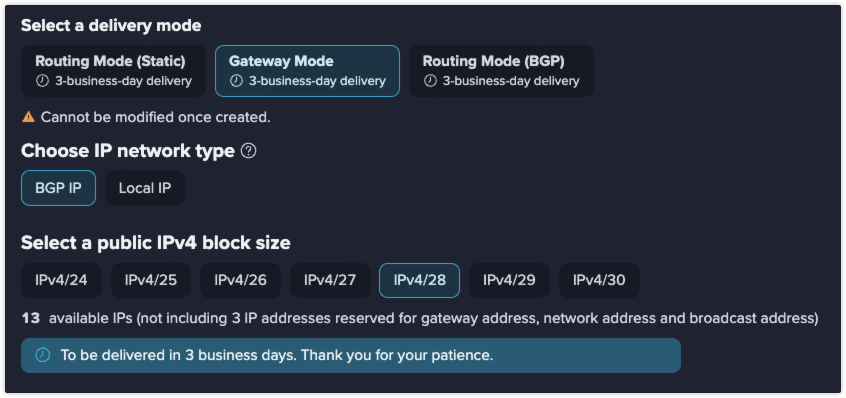
IPT Gateway Mode
In the Gateway Mode scenario, you need to configure public IP type and quantity.
## Public IP Type
#### **BGP IP**
A BGP IP is a type of elastic IP address implemented through the Border Gateway Protocol (BGP). It enables users to auto manage their network routes with high flexibility and reliability. BGP IP is suitable for network application scenarios requiring scalability and high availability.
#### **Local IP**
A local IP address is provided by a local ISP, with its registered location matching the country of the server's data center. It is ideal for applications with strict IP requirements, such as cross-border e-commerce, where a local IP enables smoother registration and operation.
## Public IP Quantity
A public IPv4/28 block will be configured by default with 13 available IPs, not including 3 IP addresses reserved for gateway address, network address and broadcast address. You can choose IPv4 block size based on your business needs.
{% hint style="info" %} **Note**
Delivery times may vary by location. The actual interface display shall prevail. Thank you for your patience.
{% endhint %}